Radiology today is more connected than ever, yet many hospitals still rely on DICOM viewers that demand local setup, constant updates, and IT support. These old systems slow down access to scans, delay reporting, and make collaboration harder across departments. The growing need for real-time imaging access, especially in teleradiology, has shown how these limitations affect both patient care and workflow speed.
A zero footprint DICOM viewer changes this by removing the need for installation or plugins. It allows radiologists to view, reconstruct, and share studies instantly through a browser on any device. This shift from setup-heavy systems to browser-native viewing marks a major step toward faster, simpler, and more secure radiology operations.
What ‘Zero-Footprint DICOM Viewing’ Means
To understand the value of a zero footprint DICOM viewer, imagine a radiologist who needs to check an urgent CT scan while traveling between hospital branches. With traditional viewers, they would depend on locally installed software, VPN access, and heavy system requirements. Every extra step delays care. Zero-footprint technology changes this experience entirely.
Here, the DICOM files remain on a secure cloud or hospital server while the viewer simply streams the image data through a browser. The radiologist logs in, views the case, applies 3D reconstruction, and writes the report within minutes, without installing anything on the device. This new model allows complete diagnostic access from any approved system, including tablets or mobile devices.
The Role of Browser-Native Rendering in This Transition
Browser-native rendering is the core engine behind this technology. It ensures that images are processed efficiently and securely without relying on external software.
- Uses advanced WebGL or server-side rendering to process 2D, MPR, and 3D views
- Delivers diagnostic-grade resolution directly in the browser
- Reduces IT dependency by removing local installations
- Ensures consistent performance across devices and operating systems
By shifting computation and visualization to the cloud, browser-native rendering enables hospitals to maintain accuracy, security, and speed while giving radiologists the freedom to work from anywhere.
How Browser-Native MPR & 3D Are Changing Daily Radiology
Modern radiology depends on precision, but also on speed and collaboration. Browser-native MPR and 3D viewers are bringing both to daily practice. What once required powerful local workstations can now be done in real time, even on lightweight laptops. This shift has made radiology faster, more consistent, and accessible across multiple sites.
Instant 3D Visualization Without Workstation Load
Think of how radiologists once had to wait for local machines to process heavy CT or MRI datasets. With browser-native MPR and 3D tools, that waiting almost disappears. The system performs all reconstruction on secure cloud servers, so the viewer only streams the ready image. A radiologist can rotate, zoom, or slice through scans within seconds, even on a mid-range laptop. Studies have shown that this cloud-based workflow reduces reconstruction time by nearly 40 percent, making urgent interpretations faster and more reliable.
Improved Collaboration Across Hospital Units
In many hospitals, collaboration between radiology, surgery, and clinical departments used to mean emailing screenshots or waiting for access to imaging workstations. Now, browser-native viewers let everyone see the same study in real time through a simple link. A surgeon planning a spine operation or an orthopedic specialist reviewing a fracture can interact with the same 3D model as the radiologist. This kind of shared access has been shown to speed up team-based decisions by almost 20 percent in large hospitals.
Accessible Imaging for On-Call or Remote Radiologists
After-hours or weekend reporting no longer depends on physical access to a workstation. A radiologist on call can open cases from a secure web link on a laptop or even a tablet. Whether it’s a stroke case in the night or a trauma scan from another branch, the images load instantly with diagnostic precision. This kind of freedom helps maintain 24/7 radiology coverage without compromising quality or data security.
Consistent Performance Across Devices
Every device now delivers the same image clarity. Whether a study is opened on a desktop in the reading room or a tablet in a conference hall, the viewer adjusts automatically. Hospitals no longer need to invest in expensive local workstations for every radiologist. Instead, performance and consistency come built into the browser itself, allowing more focus on patient care and less on technical maintenance.
Then, How’s This Teleradiology Workflow?
The true strength of a zero footprint DICOM viewer lies in how smoothly it fits into a hospital’s daily teleradiology operations. The entire process, from image capture to report sharing, happens without setup, installation, or delay. The workflow below shows how each step connects seamlessly through the browser, giving radiologists instant access and hospitals complete visibility.
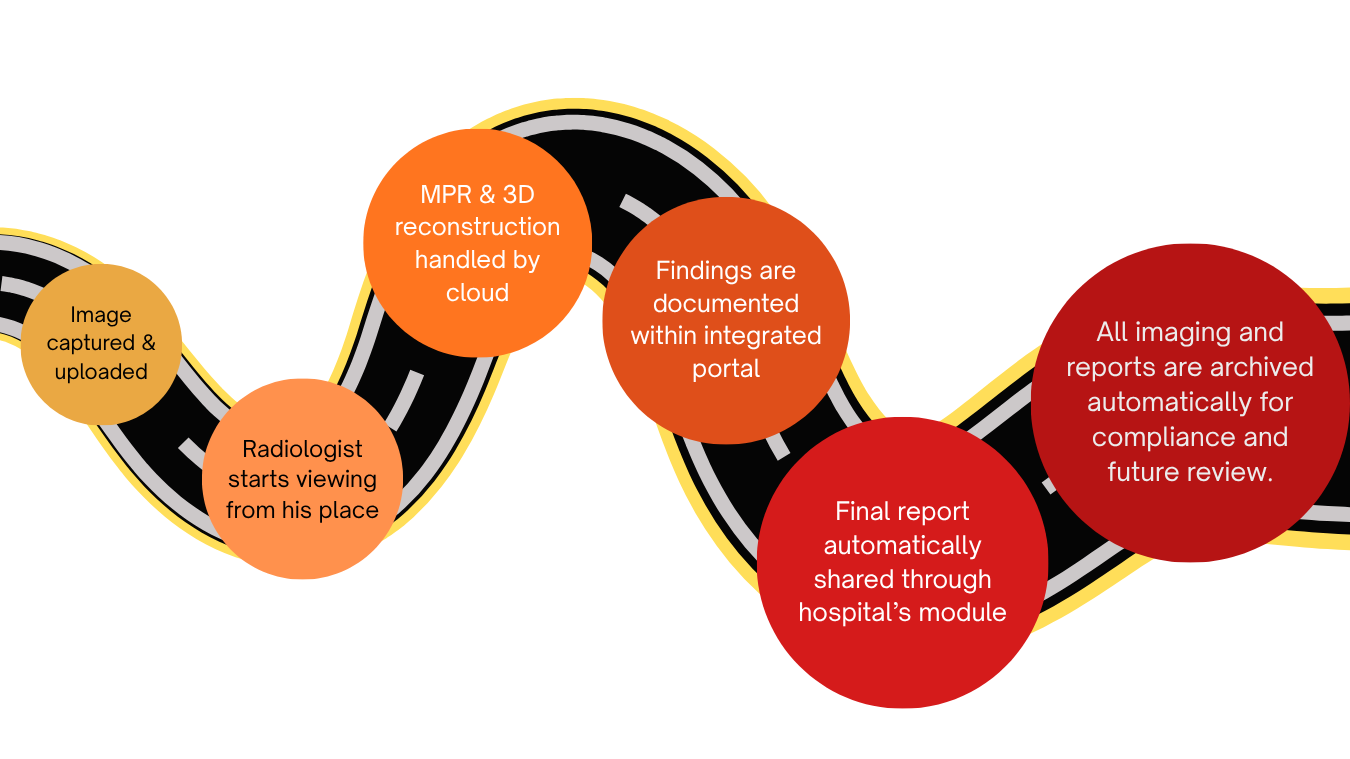
Zero-Footprint DICOM Workflow: From Scan to Report in Minutes
Relief from IT Hassles: Zero Maintenance with Full Security
One of the biggest frustrations for hospital IT teams is the constant maintenance that traditional DICOM viewers require. Each update means downtime, version mismatches, and support tickets from busy departments. The move to a zero footprint DICOM viewer changes this reality completely. It brings reliability and ease to both IT staff and radiology users.
Zero Maintenance: Simplifying the Everyday Workflow
In hospitals that use installed DICOM software, even a minor update can take hours. Every workstation must be checked, licenses managed, and user issues resolved. This process can delay imaging access and create unnecessary IT load. Zero-footprint viewing removes that burden.
Here, everything runs directly through the browser, so updates happen automatically on the server side. The IT team no longer needs to install or configure anything at user endpoints. Studies from major healthcare networks like Mayo Clinic have shown that browser-based systems reduce technical support calls by more than 50 percent compared to installed viewers. This means less time managing systems and more time ensuring clinical continuity. The result is a stable, ready-to-use platform that supports radiologists without interruption.
Full Security: Protecting Data at Every Step
For hospital administrators, patient data security is always a top concern. Traditional DICOM software stores temporary files on local drives, increasing risk if devices are misplaced or compromised. A zero footprint viewer solves this problem by keeping all data within the secure hospital network or cloud environment.
Images are never downloaded or stored on the local device. Instead, they are streamed through encrypted HTTPS connections. Multi-factor authentication, access logging, and role-based controls ensure that only authorized users can view or report cases. In fact, several healthcare compliance studies report that browser-native viewing platforms reduce local data exposure risks by nearly 80 percent.
This architecture allows hospitals to maintain strict control over data flow while giving radiologists full mobility. It’s a practical balance between accessibility and protection, designed for the real-world needs of modern healthcare.
How Mediog Brings It All Together…
Mediog’s cloud-based platform turns the concept of a zero footprint DICOM viewer into a working reality for hospitals and radiologists. It offers browser-native MPR and 3D visualization directly within its integrated PACS and RIS, giving doctors the ability to view, reconstruct, and report studies from any secure browser. The process is smooth, fast, and completely setup-free. By eliminating local installations, Mediog helps radiology departments maintain uninterrupted workflow, improve turnaround times, and lower maintenance costs. Its architecture has become the trusted choice for organizations that want both high-speed diagnostics and strong data security within their teleradiology network.
Mediog’s Clients Who Made the Switch
Mediog is proud to support several healthcare institutions and radiology professionals who now use its zero footprint DICOM viewer as part of their daily workflow:
- AMRI Hospitals – where Dr. Jiyon Sen uses Mediog’s browser-based teleradiology platform for cross-branch reporting.
- Apollo Diagnostics – where Dr. Ajit Biswal handles both emergency and scheduled imaging using Mediog’s web-based DICOM viewer.
- Spandana Heart and Super Speciality Hospital – led by Dr. Raman Sau, which relies on Mediog’s cloud teleradiology solution for real-time reporting and collaboration.
- Dr. Kingshuk Mondal (Orthopedic) and Dr. Arun Kumar Chatterjee (Radiologist) – independent specialists who use Mediog’s DICOM 3D viewer online to access and interpret imaging cases remotely.
These clients represent how Mediog is transforming radiology for modern healthcare: faster reporting, zero setup, and secure access from any device across hospitals and diagnostic centers.
Conclusion
The shift toward a zero footprint DICOM viewer is no longer a prediction. It is the practical next step for hospitals that want faster imaging access, fewer technical interruptions, and safer data handling. The evidence from real-world radiology teams shows how browser-native viewing simplifies everything from MPR to final reporting, saving both time and resources.
For decision-makers, the path forward is clear. You can experience how effortless this workflow feels through Mediog’s demo DICOM viewer, where scans open instantly and 3D visualization happens right inside your browser. It is a simple way to see how setup-free radiology can change your team’s speed, accuracy, and confidence in every case.
###